Implementing AI Customer Service: From Concept to Chatbot
Key Topics
I was recently approached by a client whose customer service team was becoming overwhelmed with routine enquiries. Their existing website received dozens of daily questions about services, pricing, and availability—many of which followed predictable patterns. The client wanted to implement an AI chatbot to handle initial customer interactions, but they were concerned about maintaining their brand voice and ensuring seamless handoffs to human operators when needed.
Breaking down this implementation, three key challenges emerged:
- How do we connect the website to an AI system that understands the business?
- How do we ensure the AI responds in the client’s brand voice and with accurate information?
- How do we create an effective triage system that knows when to escalate to humans?
Approach
1) Establishing the AI Connection via API Integration
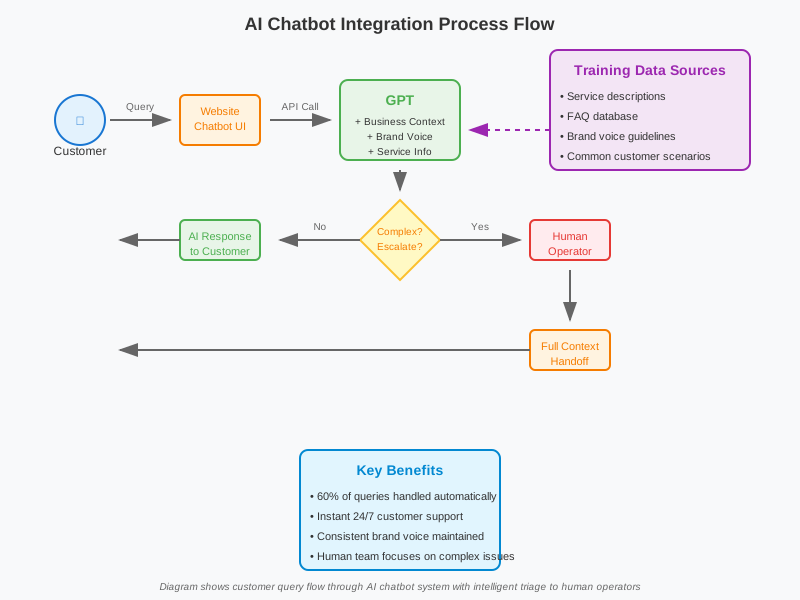
The foundation of any AI chatbot system is the connection between your website and the language model. Rather than building a chatbot from scratch, the most efficient approach is to leverage existing LLM (Large Language Model) capabilities through API integration.
This involves setting up secure API endpoints that allow your website to send customer queries to the AI system and receive contextually appropriate responses. The technical setup includes authentication tokens, rate limiting to manage costs, and error handling to ensure the system gracefully manages any service interruptions.
In this instance, we configured the API connection to process messages in real-time, ensuring customers received immediate responses without the delays typical of traditional support ticket systems.
2) Training the System with Business Context and Brand Voice
Here’s where many AI implementations fall short—they treat the chatbot as a generic question-answering tool rather than a genuine extension of the business. Our approach was fundamentally different.
We fed the system comprehensive information about the client’s services, including:
- Detailed service descriptions and pricing structures
- Common customer pain points and how the business addresses them
- Frequently asked questions with approved responses
- Brand voice guidelines, including tone, language preferences, and communication style
But beyond just information, we provided explicit guidance on how to respond. For example:
- “Always acknowledge the customer’s concern before providing solutions”
- “Use conversational language, avoid technical jargon unless specifically requested”
- “When discussing pricing, always mention that custom quotes are available”
This contextual training meant the AI wasn’t just answering questions—it was representing the business in a way that felt authentic and helpful.
3) Building an Intelligent Triage System
The most crucial aspect was determining when the AI should handle queries independently versus when it should escalate to human operators. This required building logic that could assess query complexity and emotional context.
We established escalation triggers for:
- Complex technical questions requiring specialist knowledge
- Complaints or expressions of frustration (detected through sentiment analysis)
- Requests for refunds, cancellations, or contract modifications
- Any query the AI rated as low-confidence in its response
The system was designed to seamlessly transition conversations, providing human operators with full context of the previous interaction. This meant customers never had to repeat their questions, and staff could pick up conversations with complete background information.
However, I realised during testing that this was actually where I should have started! By mapping out the triage logic first, we could have designed the AI training more efficiently, focusing on the types of queries it would realistically handle rather than trying to prepare it for every possible scenario.
Results and Conclusions
The implementation proved highly effective. Within the first month, the chatbot was successfully handling approximately 60% of initial customer queries, with a satisfaction rating comparable to human operators for routine questions. More importantly, it freed up the human team to focus on complex issues that genuinely required their expertise.
The client was particularly pleased with how the system maintained their brand personality—customers often didn’t realise they were initially speaking with AI, which was exactly the goal.
While the technical setup was relatively straightforward, the success came from the careful attention to business context and triage logic. Simply connecting an AI to your website isn’t enough; you need to train it to represent your business authentically and know its limitations.
The key learning? Start with understanding what you want the AI to achieve, then work backwards to the technical implementation. The technology is remarkably capable—it’s the strategic thinking that makes the difference.
Key details pertaining to the client’s business have been altered for purposes of confidentiality.