Troubleshooting WordPress
Key Topics: Child Themes, Database Queries, SQL, Logical Process
I was recently contacted by a client seeking support for a recurrent bug on their WordPress site. Essentially, their portfolio pages applied a filter based on certain criteria, enabling the user to view only pages related to the products they were interested in. The client described the issue and advised me that the default had been corrected by one of the website’s administrators but continued to appear periodically. The suspicion was that this was happening during updates.
Breaking down this issue, three key questions sprang to mind:
- How are the themes configured? Could updates be interfering with PHP files?
- Is the WordPress database serving data properly?
- How is the WordPress site calling that data from within the functions.php file
Approach
1) Understand How Themes Are Configured on the Site
The best practice is to implement site customisations within a child theme. If you inspect a WordPress page using your browser’s developer tools, you will often see a reference in the header to “child” or “child theme.” This is an area where the developer can create customisations and alterations to the site theme, ensuring they are preserved during updates so they do not get replaced (potentially automatically).
When WordPress serves a page to a user, it will first look in the child theme folder, and if it does not find a relevant file, it will revert to the original, or “parent” folder. This process is known as the call stack. In this instance, the pages were being served from a child theme, so problems were not originating here due to theme updates.
2) Is the WordPress Database Serving Data Properly?
Every piece of information—be it text, video, or an image—served up on a WordPress site is stored by the server in a database. This data is accessed through SQL queries. The next step was to test whether the data still existed in the database.
This can be achieved using WordPress’ built-in database tools and some knowledge of SQL. The most useful command to show everything within a database:
SELECT * FROM database_name_here;
Having confirmed that this returned data, I could then test whether the filters applied by the PHP code were working, e.g.:
SELECT * FROM table_name_here WHERE location = 'Europe';
Or extending that logic:
SELECT * FROM table_name_here WHERE location = 'Europe' AND power_output > 8;
With the correct query language, the database was serving data correctly. This indicated that the issue likely lay within the PHP functions handling the filtering process.
3) How Is the WordPress Site Calling That Data From Within the PHP Functions?
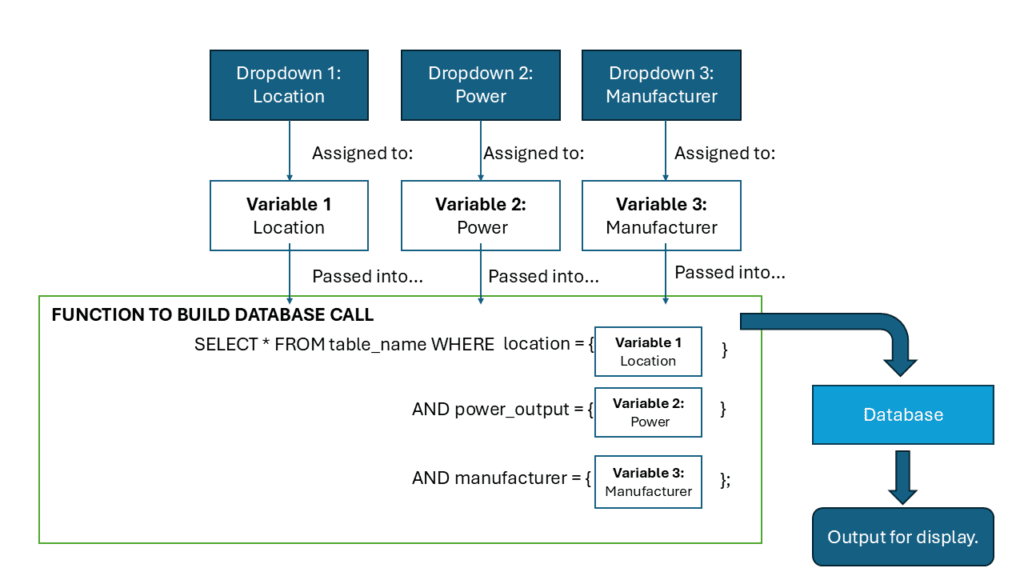
And this, I realised, was where I could have started! Within the functions.php file, the filtering dropdowns were being called and assigned to variables (e.g. location, power output, manufacturer, etc.). These variables were then passed into another function responsible for constructing the SQL query. This SQL query was subsequently executed against the database, displaying the relevant items based on user selections.
However, there was incorrect syntax in part of the function, causing the database to return an error—hence, nothing was displayed. Once identified, this was a straightforward fix: updating the code, testing, and pushing the corrected version to the live site.
The accompanying image provides a visual representation of how the query is built from the dropdowns to extract the required data from the database. Note that this is a simplified illustration—additional logic is required to handle fields where the user does not make an explicit choice (in such cases, the query should return all entries, i.e. SELECT *).
Conclusions
Although the solution was straightforward in the end, some experience is required to determine where to start dissecting the problem and following the logic through. Knowledge of SQL queries is valuable, as is the ability to test via phpMyAdmin.
The client was pleased with the result—the site is back up and running and should now be more resilient with the simplified code.
* Key details pertaining to the clients business have been altered for purposes of confidentiality.